Reference / Configuration
Configuration
Settings of the desktop app, environment variables of every mergecat component, and where mergecat stores its data on macOS, Windows and Linux.
mergecat works without configuration on any local repository. This page lists what you can change: the settings of the desktop app, the environment variables of the desktop app, the command line and the MCP server, and where each component keeps its data. VS Code settings are listed on the VS Code page.
Desktop app settings
Open File › Settings… (⌘, on macOS, Ctrl, on Windows and Linux) or the gear icon in the top bar. Settings are preferences of this computer; credentials are managed in Connections.
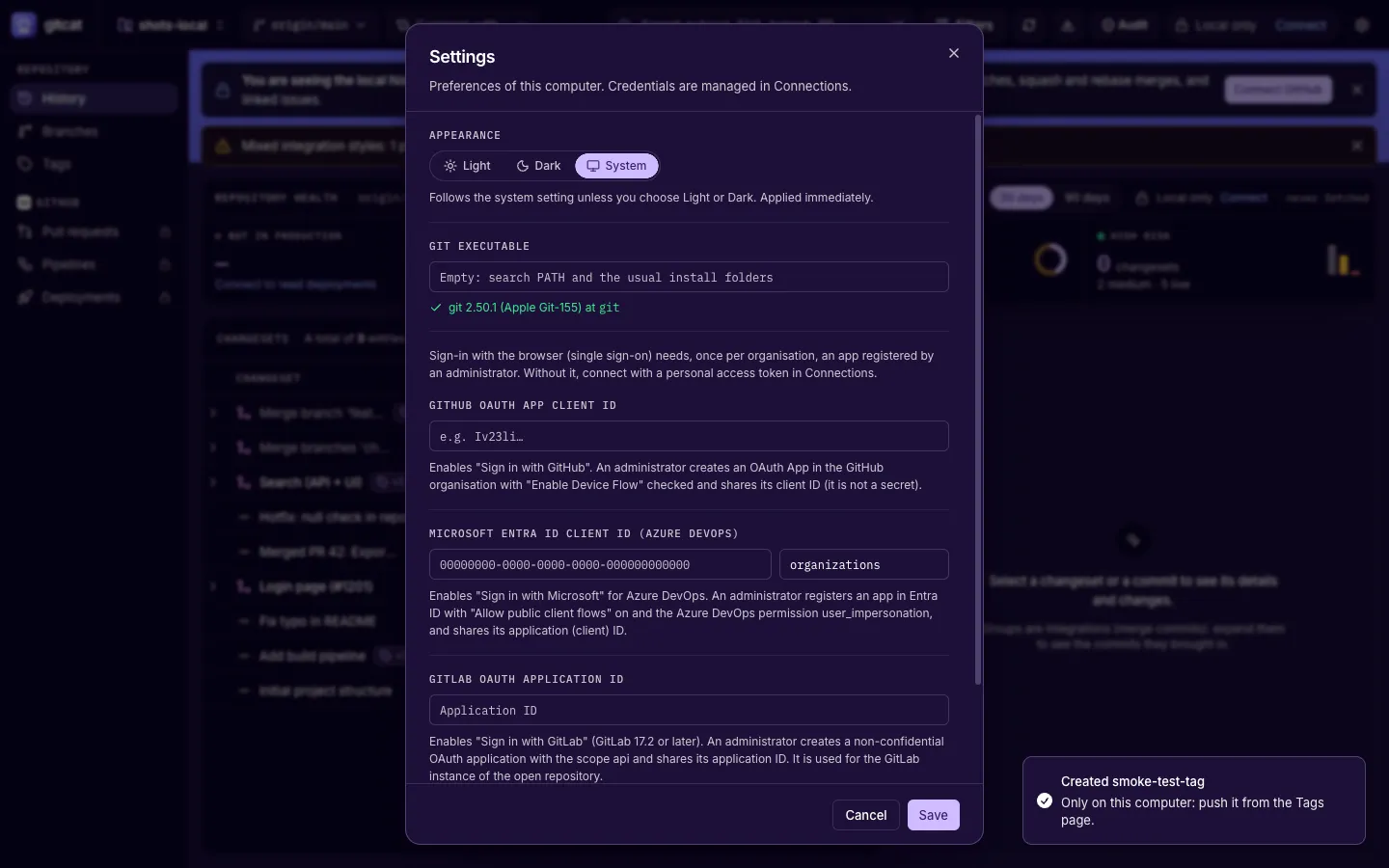
Settings: appearance, Git executable and the client IDs of the browser sign-ins.
| Setting | Default | Description |
|---|---|---|
| Appearance | System | Light, Dark or System; applied immediately |
| Git executable | empty | Path of the git executable. Empty: git on the PATH, then the usual install folders. The dialog shows the Git version found, or the error |
| GitHub OAuth App client ID | empty | Enables Sign in with GitHub: the client ID of an OAuth App with Enable Device Flow checked, created once by an administrator. It is not a secret |
| Microsoft Entra ID client ID (Azure DevOps) | empty | Enables Sign in with Microsoft for Azure DevOps: the application (client) ID of an Entra ID app with Allow public client flows and the Azure DevOps permission user_impersonation |
| Microsoft tenant | organizations | organizations (any work account), your tenant ID or your domain |
| GitLab OAuth application ID | empty | Enables Sign in with GitLab (GitLab 17.2 or newer): a non-confidential OAuth application with the scope api. Used for the GitLab instance of the open repository |
| Entries per page | 200 | Top-level history entries loaded at a time, 50 to 5000 |
Without the client IDs, connect with a personal access token. How to register the apps: GitHub, GitLab, Azure DevOps.
The settings are stored in settings.json in the app data folder, together with the last 10 repositories you opened. The appearance is stored by the app window.
Environment variables
| Variable | Used by | Purpose |
|---|---|---|
MERGECAT_GITHUB_CLIENT_ID | Desktop | OAuth App client ID for Sign in with GitHub |
MERGECAT_MICROSOFT_CLIENT_ID | Desktop | Entra ID app client ID for Sign in with Microsoft (Azure DevOps) |
MERGECAT_MICROSOFT_TENANT | Desktop | Entra ID tenant (default organizations) |
MERGECAT_GITLAB_CLIENT_ID | Desktop | GitLab OAuth application ID for Sign in with GitLab |
MERGECAT_GITLAB_URL | Desktop | GitLab instance URL (self-managed GitLab, tests) |
MERGECAT_GITHUB_API_URL, MERGECAT_GITHUB_GRAPHQL_URL | Desktop | GitHub REST and GraphQL endpoints (tests) |
MERGECAT_USER_DATA_DIR | Desktop | A separate folder for settings, credentials and caches (tests, side-by-side runs) |
MERGECAT_MEMORY_CREDENTIALS=1 | Desktop | Do not use the system keychain: credentials stay in memory only (tests) |
MERGECAT_GIT_PATH | Command line, MCP server | Git executable |
GITHUB_TOKEN | MCP server | Pull request data of GitHub repositories; GH_TOKEN is used when it is not set |
GITLAB_TOKEN | MCP server | Merge request data of GitLab repositories; GL_TOKEN is used when it is not set |
AZURE_DEVOPS_EXT_PAT, AZURE_DEVOPS_TOKEN | MCP server | Pull request data of Azure DevOps repositories: a personal access token, or a Microsoft Entra token |
MERGECAT_AI_SERVICE | MCP server | The AI service the compliance question is about when the client is not recognized: claude, copilot, openai, gitlab-duo or another name (Other AI assistants) |
MERGECAT_COMPLIANCE_DIR | MCP server | Folder of the AI usage records |
MERGECAT_REPOSITORY | MCP server | Repository used when a tool gets no repository parameter |
CLAUDE_PROJECT_DIR | MCP server | Set by Claude Code: the project, used after MERGECAT_REPOSITORY (other clients: the folders they have open) |
The client ID variables are read when the desktop app starts and fill the settings you left empty; a value entered in Settings wins. They let an administrator provide the organisation’s sign-in apps, for example through a managed environment.
VS Code settings
The extension’s settings (mergecat.gitPath, mergecat.pageSize, mergecat.environments.definitions, mergecat.risk.sensitiveAreas, mergecat.gitlab.clientId and others) are listed with their defaults on the VS Code page.
Data locations
Desktop app
The app data folder holds settings.json, the encrypted credentials.bin and the pull-request-cache/ folder.
~/Library/Application Support/mergecat/%APPDATA%\mergecat\~/.config/mergecat/Or $XDG_CONFIG_HOME/mergecat/ when XDG_CONFIG_HOME is set.
MERGECAT_USER_DATA_DIR replaces this folder. Exports and audit reports go where you save them; the save dialog suggests your Documents folder.
Claude Code plugin and MCP server
AI usage records (Markdown files and compliance-log.jsonl):
~/Library/Application Support/mergecat/compliance/%APPDATA%\mergecat\compliance\$XDG_DATA_HOME/mergecat/compliance/Without XDG_DATA_HOME: ~/.local/share/mergecat/compliance/.
MERGECAT_COMPLIANCE_DIR replaces this folder. PDFs are written to Claude’s scratchpad or to the mergecat folder in the system temporary folder; changelogs are documents of the conversation.
VS Code extension
Pull request data is cached in the extension’s global storage folder in VS Code’s user data; tokens are in VS Code’s SecretStorage. Audit reports go where you save them; the save dialog suggests the repository folder.
Command line
The command line stores nothing: it prints to the terminal.
None of the mergecat components writes settings or caches into your repositories.