Getting started / How mergecat works
How mergecat works
How mergecat turns the Git history of a branch into changesets, names the merged branches, and handles squash, rebase and other integration styles.
mergecat does not invent structure: everything it shows comes from the commit graph, the commit messages and, when connected, the pull requests of the hosting service. This page explains the rules, so you can predict what you will see and recognise when a history does not follow them.
The first-parent walk
When you merge a feature into main, the merge commit records two parents: the first is the commit main was on, the second is the tip of the feature. Following only first parents from the tip of a branch gives its mainline: the sequence of states the branch itself went through.
mergecat walks this first-parent chain, newest first, and turns each commit on it into one entry:
| Commit on the mainline | Entry |
|---|---|
| One parent | A direct commit: made on the branch itself, one row. |
| Two or more parents | An integration (changeset): a merge, shown as a group with the commits it brought in. |
What an integration contains
For a merge M with parents P1, P2..Pn, the group contains the commits reachable from P2..Pn but not from P1. In Git terms:
git log P2..Pn ^P1These are exactly the commits that entered the branch through M. In this example, merging feature at M brings in C and D:
main      A───B───────M
               \     /
feature         C───D
Forward integration
Feature branches often merge main back in to stay current (“merge main into feature”). The commits that came from main that way are reachable from P1, so they are not counted again in the feature’s group. The “merge main into feature” commits themselves are hidden by default: they brought nothing new into the branch.
Turn off Hide forward-integration merges in Filters to see them. They then appear inside the group with a forward integration chip.
Nested merges
When feature A is merged into feature B, and B into main, A becomes a sub-group inside B’s changeset, marked as a Nested merge. Expand it to see A’s commits.
Octopus merges
A merge of three or more branches at once gets the octopus flag. Its group has one lane per merged branch, each headed by the branch name, and the Branch / PR column joins the names with +.
Empty merges
A merge that brought in no commit that was not already on the branch gets the empty flag.
Naming the merged branch
Git does not store branch names in commits. mergecat looks for the name in this order and stops at the first source that has it:
- The merge message. Works offline and survives the deletion of the branch.
- The pull request from the hosting service (connected mode). Works after the branch was deleted.
- A branch that still points at the merged commit, local or remote.
- The short SHA of the merged commit, when nothing else is known.
Hover over a branch chip to see which source was used; the details pane shows it under Branch. When the name is unknown and connecting would resolve it, the chip shows a lock icon.
These merge messages are recognised:
| Written by | Message | What mergecat reads |
|---|---|---|
git merge | Merge branch 'feature/x' into main, Merge branches 'a', 'b' and 'c' | Branch names |
git pull | Merge branch 'x' of https://… | Branch name |
git merge of a remote branch | Merge remote-tracking branch 'origin/x' | Branch name without the remote |
git merge of a tag | Merge tag 'v1.2.0' | Tag name |
| GitHub | Merge pull request #12 from org/feature-x | Pull request number and branch |
| GitLab | Merge branch 'x' into 'main' with See merge request group/project!12 in the body | Branch, merge request number and title |
| Bitbucket | Merged in feature-x (pull request #12) | Branch and pull request number |
| Azure DevOps | Merged PR 12: Title | Pull request number and title only |
A convention that keeps names readable
Complete pull requests with a merge commit (no fast-forward) and put the branch name or the work item ID in the pull request title. The title ends up in the merge message and survives the deletion of the branch.
Integration styles
How your team completes pull requests decides what the history contains. mergecat shows each style as faithfully as the graph allows and says when grouping is incomplete.
| How pull requests are completed | What mergecat shows |
|---|---|
| Merge commit (no fast-forward), including Azure DevOps semi-linear merge | Groups. |
| Squash | One commit. Flagged squash when the message looks like a pull request (Title (#12), Merged PR 12: Title, Bitbucket’s Merged in). Connected: flagged squash-merged PR, and the details pane lists the original commits. |
| Rebase and fast-forward | Direct commits. Connected: grouped per pull request as a rebase-merged PR. |
Fast-forward of a feature that used forward integration, or git pull merges on the branch itself | Flagged inverted: from there the first-parent path may follow the wrong side (“foxtrot” merges). |
| Shallow clone | A warning; groups may be incomplete. The commit where the history is cut is flagged shallow. |
When one of these situations affects the branch, a warning bar appears above the list:
| Warning | When |
|---|---|
| This branch has no merge commits | Every entry is a direct commit, typically rebase or fast-forward merges. Connect the hosting service to group them. |
| This branch is not integrated with no-fast-forward merges | No merges, and pull requests look squash-merged. |
| Mixed integration styles | Some pull requests look squash-merged among regular merges. |
N merge(s) merged "main" into something else | One or more inverted merges. |
| This is a shallow clone | Run git fetch --unshallow for complete results. |
More about each limit and how to avoid it: Limits and integration styles.
Performance
mergecat does not start one Git process per merge. It reads the whole history of the branch with one git log, then computes the groups in memory: it walks the first-parent chain from the oldest commit and lets each merge claim the commits not claimed yet. The cost grows linearly with the number of commits; a history of 11,000 commits is indexed in well under a second. The list header shows how long the last read took (read in … ms).
Other work happens on demand:
- diffs are computed with
git diffwhen you select a row; - pull request data (connected) is loaded for the entries you are looking at and cached per commit SHA, so it stays valid across fetches;
- the most recently read histories stay in memory, so switching back to a branch whose tip has not moved is immediate.
List and graph
The History page shows the same history in two layouts:
- List: the changesets, with integrations you can expand to the commits they brought in.
- Graph: every commit with its lanes, like
git log --graph, computed once for the whole history. Each commit carries a chip with the changeset that brought it into the branch; the chip is highlighted on the commit that integrated it.
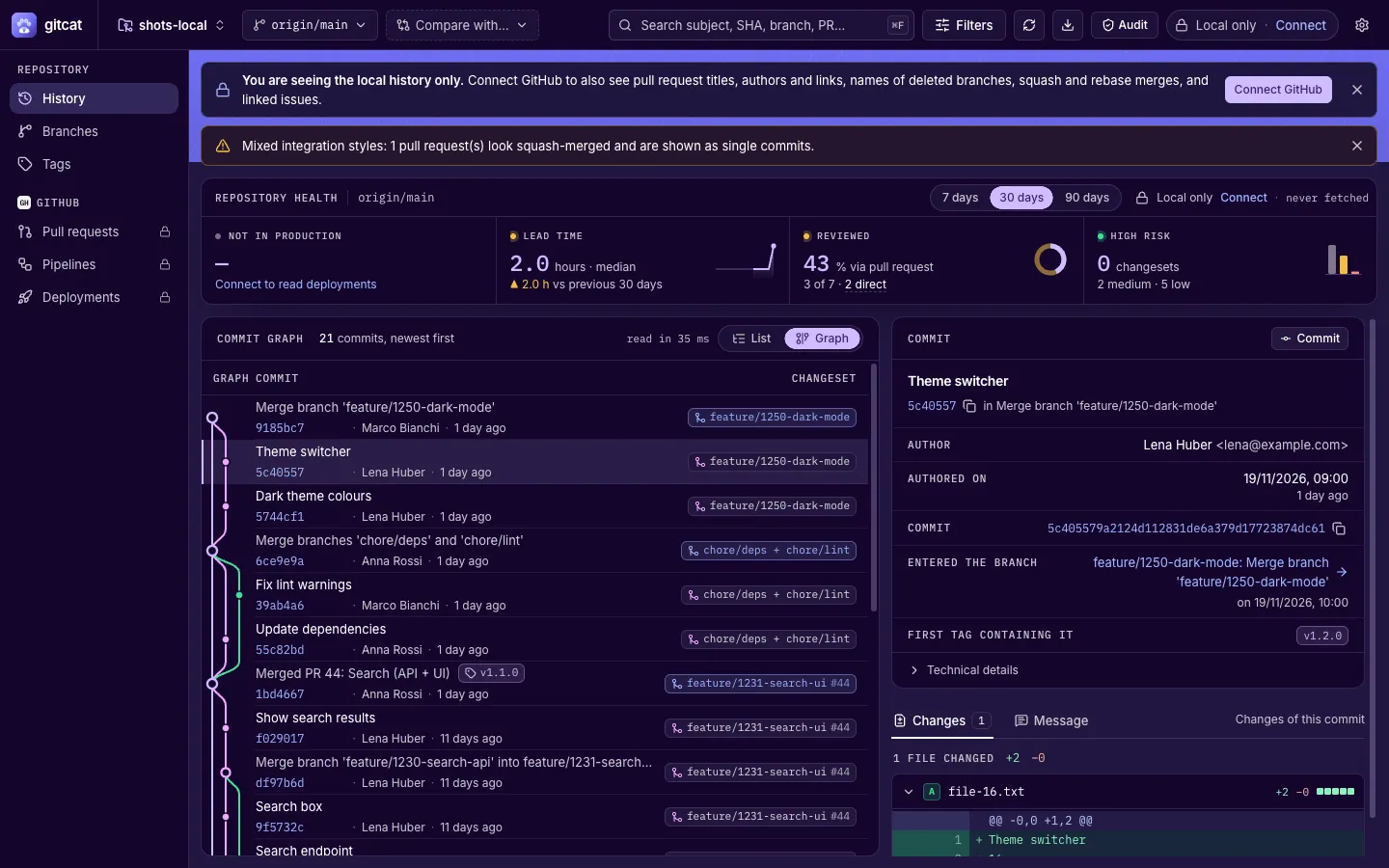
The graph layout: every commit, tagged with its changeset.
Read-only by design
mergecat runs Git commands that read. It writes only when you start an action yourself:
| Action | What runs |
|---|---|
| Fetch on the Branches page | git fetch --all --tags --prune (your local branches are not changed) |
| New tag, Push | git tag, git push <remote> refs/tags/<name> |
| New pull request | A call to the hosting service |
Fetch and tag pushes use your Git credentials (your credential helper); mergecat never asks for a Git password.