Compliance and audit / Change audit reports
Change audit reports
Document every change of a release or a deployment, with who wrote, integrated and approved it, its risk and its environments, in a fingerprinted report.
The change audit report lists every change of a range (one release, two environments, or what the next deployment would bring) with who wrote it, who integrated it, whether it went through a pull request and who approved it, its risk factors and the environments that run it. Use it as evidence for release reviews, change-management audits and incident investigations.
Evidence for change management
The report documents facts from Git and from your hosting service; it does not judge them. Changes without a pull request, without approval or with high risk are counted and listed so that a reviewer can look at them. How you act on them is part of your change and release policy.
What the report contains
Header
| Field | Content |
|---|---|
| Title | For example Change audit: v1.1.0 → v1.2.0 or Change audit: staging not yet in production |
| Repository | owner/name on the hosting service (or the folder name) and the remote URL |
| Branch | The analysed branch or commit, the base it is compared with, and the tip commit |
| Period | Integration date of the oldest and of the newest change |
| Pull request data | Whether approvals come from the hosting service, or are unknown |
| Environments | The environments checked for each change |
| Generated | Date and time, and the app that produced the report |
| Fingerprint | SHA-256 of the reported facts (see Fingerprint) |
Summary
Changes, via pull request, without pull request, direct commits, approved, not approved, review unknown, high risk, reverts and authors. The JSON format also has medium risk, integrators and the first and last integration dates.
Needs attention
The HTML report lists first the changes that are high risk, not approved or without a pull request, then all changes.
Each change
| Field | Content |
|---|---|
| Date | When the change entered the branch (integration date) |
| Change | Title, pull request number and link, merged branch, head commit |
| Linked issues | Issues linked to the pull request (with a connection) |
| Commits | Every commit of the change: SHA, subject, author, date |
| Size | Files changed, lines added and removed |
| Integrator | Who merged or committed the change into the branch |
| Review | Review state and the people who approved |
| Risk | Level (low, medium, high) and the factors behind it |
| Environments | The environments that already run the change |
Review states
| State | Meaning |
|---|---|
| Approved | The pull request has at least one approval on the hosting service |
| Not approved | The pull request was merged without an approval |
| Unknown (not connected) | The change went through a pull request, but approvals could not be read because the hosting service is not connected |
| No pull request | A direct commit or a local merge: no review is recorded |
Approvals need a connection
Who approved a pull request is stored by GitHub, GitLab or Azure DevOps, not by Git. Connect the hosting service before you export (see Connections); otherwise approvals are reported as “unknown” and the report says so in its header. The command line never connects to a hosting service, so its reports always show approvals as unknown.
Risk factors
Every change gets a score from what it changed and how it entered the branch. A score of 5 or more is high, 2 to 4 is medium, below 2 is low. The level is a hint for reviewers, not a verdict.
| Factor | Points | When |
|---|---|---|
| Very large change | 3 | 1,500 lines changed or more |
| Large change | 2 | 500 lines changed or more |
| Many files | 1 | 30 files or more |
| Mostly deletions | 1 | 300 lines removed or more, and more than twice the lines added |
| Database schema or migrations | 3 | Files such as **/migrations/**, **/*.sql, **/db/migrate/**, Flyway, Liquibase |
| Build or deployment pipeline | 2 | .github/workflows/**, azure-pipelines*.yml, .gitlab-ci.yml, Jenkinsfile, bitbucket-pipelines.yml, Fastfile |
| Configuration | 2 | appsettings*.json, *.config, .env*, application*.yml, application*.properties, *.ini |
| Authentication, permissions or certificates | 2 | **/auth/**, **/security/**, *.pem, *.pfx, *.key, *.p12 and similar |
| Infrastructure | 2 | Dockerfile*, docker-compose*.yml, *.tf, *.bicep, **/k8s/**, **/helm/** |
| Dependencies | 1 | package.json, lock files, *.csproj, pom.xml, build.gradle*, requirements*.txt, go.mod, Cargo.toml and similar |
| No tests changed | 2 | Code files changed without any test file |
| Committed directly to the branch | 2 | Direct commit without a pull request |
| Merged without a pull request | 1 | Local merge without a pull request |
| Merged with changes requested | 2 | The pull request was merged while changes were requested (with a connection) |
| Merged without approval | 2 | The pull request has no approval (with a connection) |
| Unclear integration path | 1 | The branch was merged into something else here (“inverted” merge) |
| Many authors | 1 | More than three authors |
| Reverts an earlier change | 1 | The subject starts with “Revert” |
In VS Code you can replace the sensitive areas and the test file patterns with your own conventions: mergecat.risk.sensitiveAreas and mergecat.risk.testPatterns (see VS Code settings).
Fingerprint
The report carries a SHA-256 fingerprint of the facts it reports: the branch, the base, the tip commit and, for each change, its head commit, its commits, the review state, the approvers, the risk level and the environments. The generation time is not part of it.
- Regenerating the report on the same history with the same data (approvals, environments, risk rules) gives the same fingerprint. Any change in these facts gives a different one.
- The HTML report shows it in the footer, the Markdown report in the header and the JSON report in the
fingerprintfield. The CSV format has no fingerprint. - The fingerprint is a checksum, not a digital signature: anyone with the same data can compute it. To detect later changes to a report, store the fingerprint separately, for example in the release ticket or the change record.
Formats
| Format | Best for | Content |
|---|---|---|
| HTML | Reading, printing, PDF | Header, summary cards, “needs attention”, all changes with risk factors and commits, fingerprint in the footer. Open it in a browser and print it to PDF (the print layout is A4 landscape). |
| Markdown | Wikis, pull requests, tickets | Header with fingerprint, summary table, one row per change |
| CSV | Spreadsheets | One row per change with the columns integration_date, entry_type, head_sha, title, branch, pr_number, pr_url, integrator, authors, commits, review, approved_by, linked_issues, risk, risk_factors, files, lines_added, lines_removed, environments. Cells that start with =, +, - or @ get a leading apostrophe so that spreadsheets do not run them as formulas. |
| JSON | Other tools, archives | Everything: header, summary, every change with its commits, statistics, risk factors and environments, and the fingerprint |
Produce a report
What the next deployment would bring. On the Deployments page Needs a connection, choose the environment under Live in (for example production) and what to Compare with (another environment, or the main branch). Then open Export audit report… and choose the format. The report covers exactly the changes listed on the page.
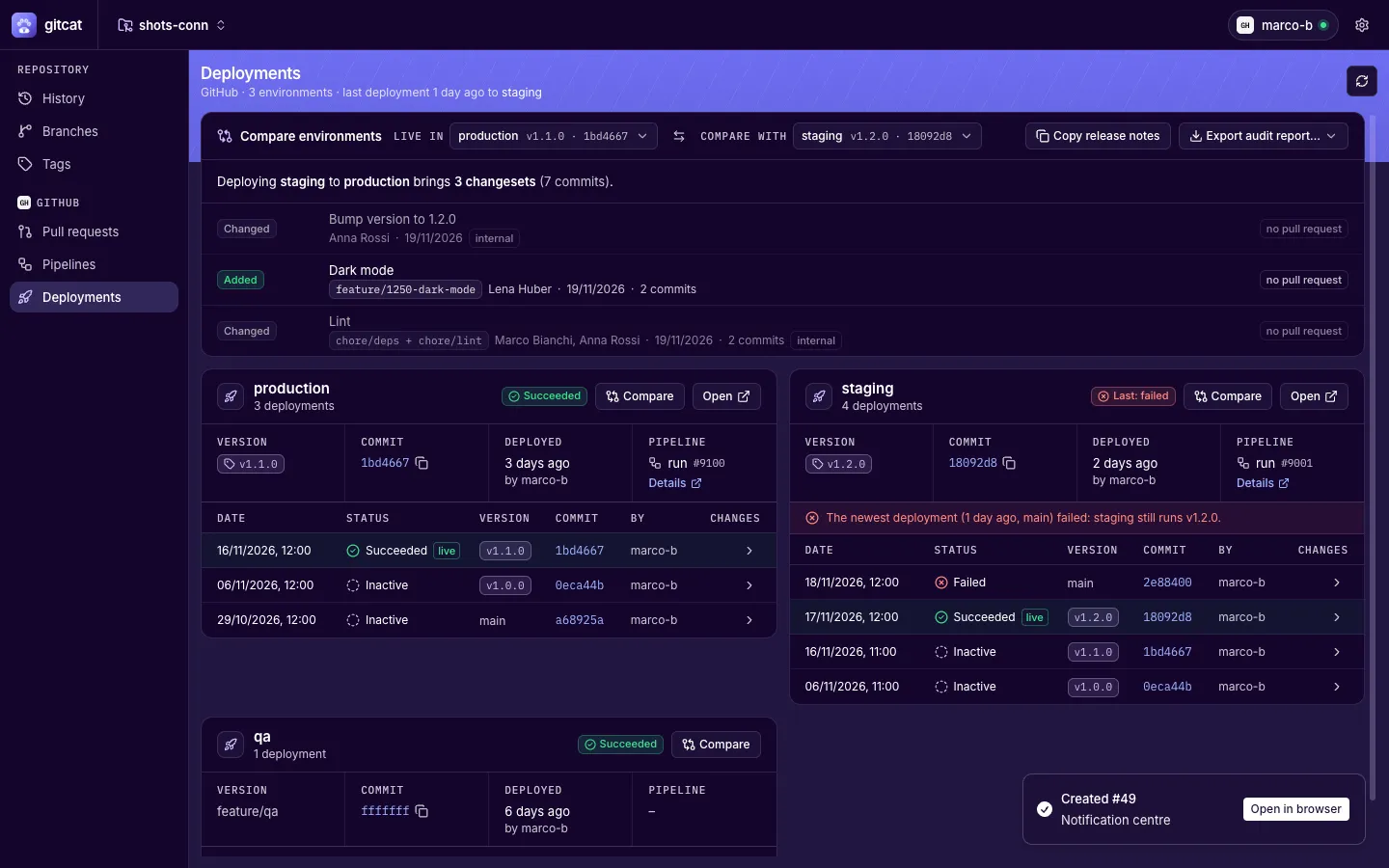
Compare environments: deploying staging to production brings three changesets. Export audit report… documents exactly these.
Any range. Open the Audit report dialog from the Audit button in the toolbar of the History page, from the Export menu (Audit report…), or from File › Audit Report…. Choose which changes:
- Current view: the branch, base and filters of the History page;
- Between two releases: what entered after the first tag, branch or commit, up to the second;
- Between two environments: what deploying one environment (or the default branch) onto another would bring Needs a connection;
- Not yet in an environment: what the next deployment of the current branch would bring Needs a connection.
Pick HTML, Markdown, CSV or JSON and click Export…. The save dialog suggests your Documents folder. A notification summarises the report (changes, without pull request, high risk, not approved) and offers to open it.
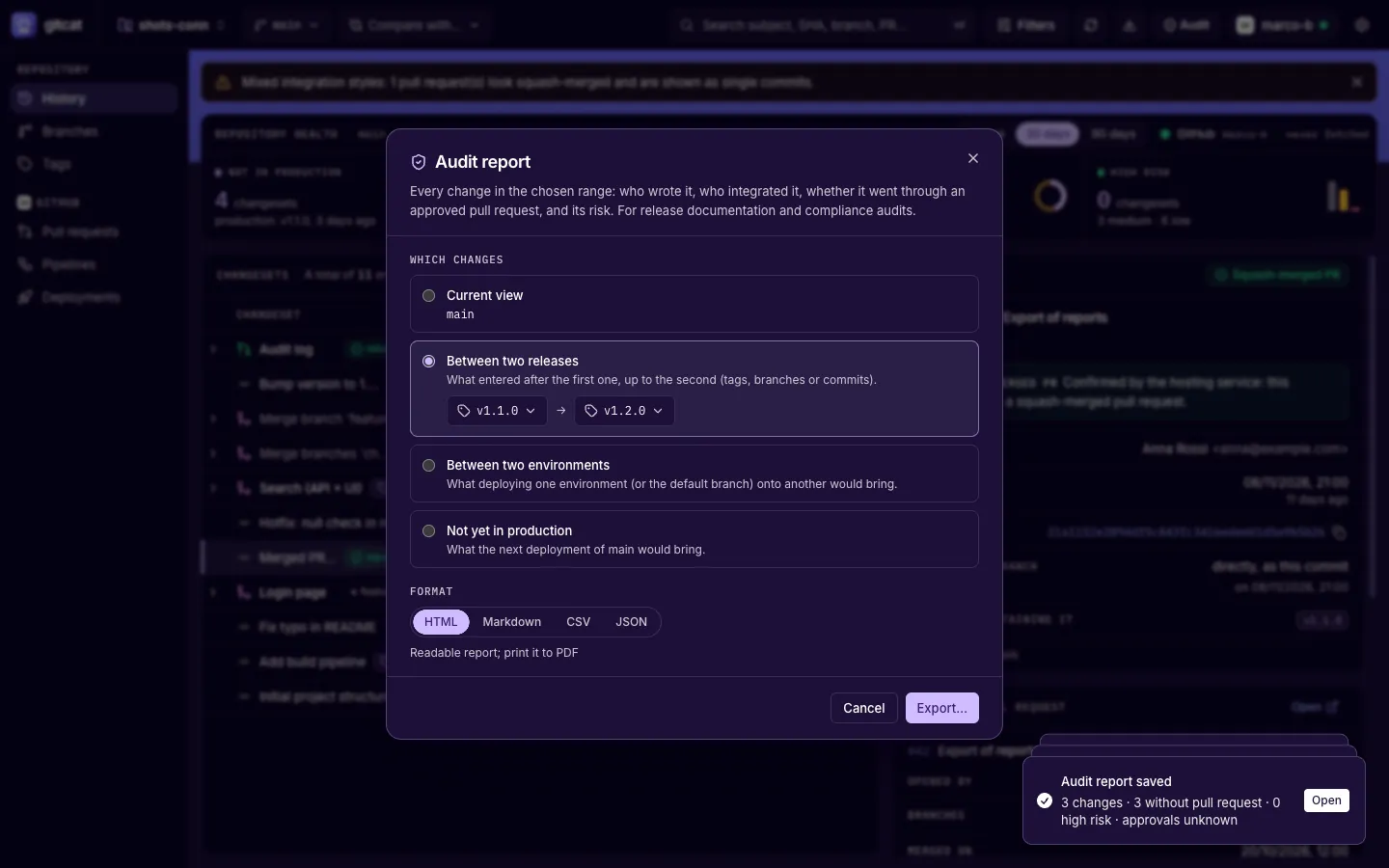
The Audit report dialog: two releases, HTML. The notification summarises the saved report.
When the repository’s hosting service is not connected, the dialog explains that approvals will be reported as “unknown” and offers Connect or Continue without.
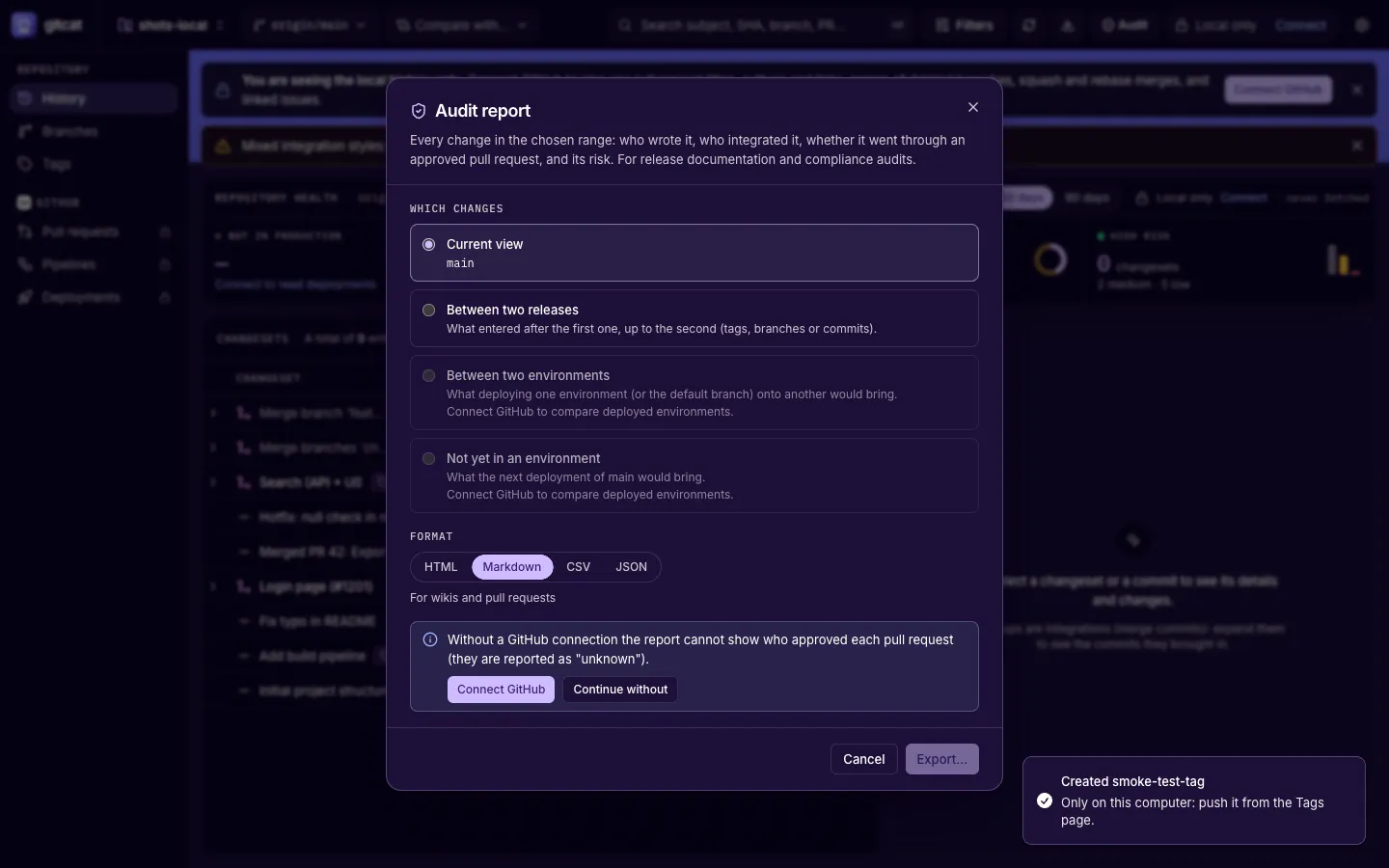
Without a connection: connect first, or continue with approvals reported as unknown.
The desktop app does not fill the Environments column of the report; VS Code and the command line do.
Command. Run mergecat: Export Audit Report… from the Command Palette or from the … menu of the Changesets view, then choose the scope:
- the current view;
- Between two releases… (tags, branches or commits);
- Between two environments… (the same choice as on the Deployments page);
- Not yet in an environment.
Choose the format (HTML, Markdown, CSV or JSON) and where to save the file. The save dialog suggests the repository folder: choose another folder if the report should not end up in the repository. A notification summarises the report and offers to open it.
Deployments page. Open Deployments, use Compare environments and click Export audit report… to document exactly the changes the next deployment would bring.
When the hosting service is not connected, the command first warns that approvals will be reported as “unknown” and offers Connect or Continue without.
The Environments column lists the environments configured in mergecat.environments.definitions, the ones detected from branch and tag names, and, with a connection, the latest deployments of the hosting service.
# Everything that entered main since v1.1.0, as HTML
node packages/core/dist/cli.cjs --repo ~/src/web-shop --audit --base v1.1.0 --format html > audit.html

# With environments: Production runs the newest tag matching v*, Staging runs origin/staging
node packages/core/dist/cli.cjs --repo ~/src/web-shop --audit --base v1.1.0 \
--env 'Production=tag:v*' --env 'Staging=origin/staging' --format json > audit.json| Flag | Effect |
|---|---|
--audit | Prints the audit report instead of the history |
--base <ref> | Only what entered after this tag, branch or commit |
--env Name=ref | An environment that runs a branch or tag; repeatable |
--env Name=tag:pattern | An environment that runs the newest tag matching the pattern |
--format | html (default for --audit), markdown, csv or json |
--since, --until, --grep, --author | Filter the changes |
Quote the --env values: shells expand *. The command line reads Git only, so approvals are always unknown. See Command line for every flag.
A routine for releases
- Before deploying, open Compare environments and review what the deployment will bring.
- Export the report as HTML for people and JSON for the archive, with the hosting service connected.
- Look at the “needs attention” section: changes without a pull request, not approved or high risk.
- Store both files with the release documentation and write the fingerprint into the release or change ticket.