Desktop app / Branches
Branches
The status of every branch at a glance, against origin and against the base branch, with merge conflicts, age filters and a safe fetch.
The Branches page lists every local branch and the remote branches that have no local copy, and tells you for each one whether it is pushed, behind, merged or in conflict with the base branch. It reads the local clone and never checks out, merges or deletes a branch. Open it from Branches in the navigation.
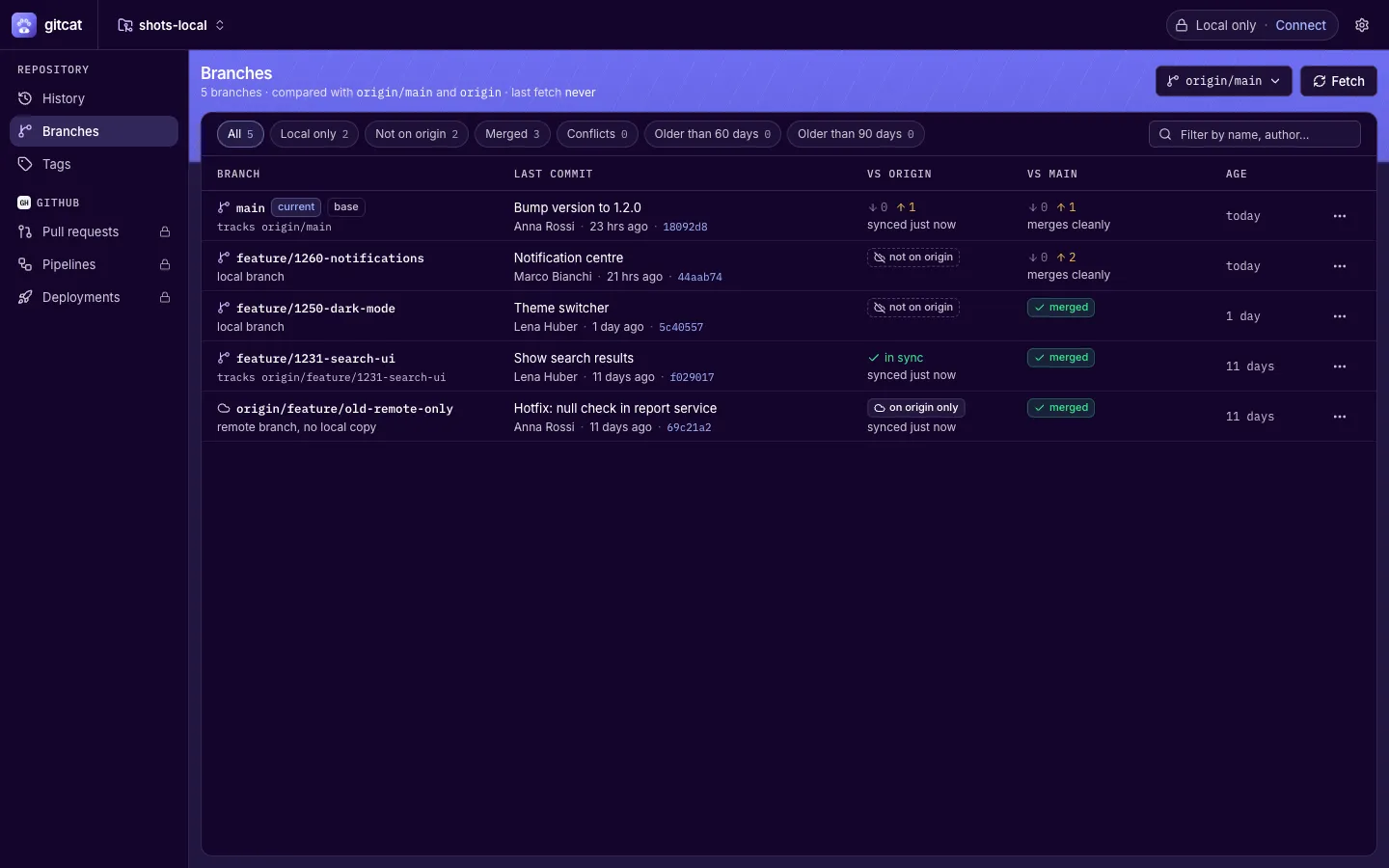
The Branches page: one row per branch.
The header says how many branches there are, which base branch and remote they are compared with, and when the repository was last fetched.
Columns
| Column | What it shows |
|---|---|
| Branch | The name; current for the branch checked out in the working tree, base for the base branch. Below: the upstream it tracks (tracks origin/x), “local branch”, or “remote branch, no local copy”. |
| Last commit | Subject, author, age and short SHA of the newest commit. |
| vs origin | ↓ commits to pull and ↑ commits to push, or in sync, not on origin (never pushed), upstream deleted (usually after the pull request was merged) or on origin only. Below: when the remote branch was last updated here, by a fetch or a push. |
| vs base | ↓ commits behind and ↑ commits ahead of the base branch, merged when everything of the branch is already in the base, and conflicts when merging it into the base would conflict. Below: the number of files in conflict, or “merges cleanly”. |
| Age | Days since the last commit. Orange from 60 days, red from 90 days. |
Hover over conflicts to see the files that would conflict.
Base branch
The picker in the header sets the branch that vs base, merged and conflicts are computed against. It starts on the default branch of the repository (usually origin/main). Choose a release branch, for example, to see which feature branches would conflict with it.
Conflict check
mergecat checks each branch that has diverged from the base with git merge-tree, which computes the merge without touching your working tree or your branches. The check needs Git 2.38 or later; with an older Git the page says so and the column shows “conflict check needs Git 2.38” instead.
Filters and search
The chips above the list filter the rows and show how many branches match:
| Filter | Branches shown |
|---|---|
| All | Local branches and remote branches without a local copy. |
| Local only | Branches that exist only on this computer. |
| Not on origin | Never pushed, or deleted on the remote. |
| Merged | Everything of the branch is already in the base branch. |
| Conflicts | Merging the branch into the base branch would conflict. |
| Older than 60 days | Last commit more than 60 days ago. |
| Older than 90 days | Last commit more than 90 days ago. |
The search box (Filter by name, author…) matches the branch name and the author and subject of the last commit.
Merged and the age filters are a quick way to find branches to clean up; mergecat leaves the deletion to you.
Fetch
Fetch runs git fetch --all --tags --prune: it updates the remote branches and the tags from every remote, and removes the remote branches that were deleted on the server. Your local branches and your working tree are not changed. Fetch uses your Git credentials (your credential helper); mergecat does not ask for a password. After a fetch the branch pickers and tag chips of the whole app are up to date.
Row actions
The ⋯ button at the end of each row opens:
| Action | What it does |
|---|---|
| Copy name | Copies the branch name. |
| Show history | Opens the History page on this branch. |
| Create tag at head… | Opens New tag on the newest commit of the branch. |
| Create pull request… | Opens New pull request with this branch as the source. Needs a connection; not available for the base branch. |