Conessions / Conetâ GitHub
Conetâ GitHub
Conet mergecat a GitHub cun Jentre cun GitHub, la GitHub CLI o un token di acès personâl, e configure la OAuth App che un aministradôr al regjistre une volte sole.
Tradusude dal inglês cul jutori de IA. In câs di dubi e vâl la version in inglês.
Conetint GitHub si zontin titui, autôrs e colegaments des pull request, nons dai branch eliminâts, squash e rebase merge, etichetis, issue colegadis, GitHub Actions e deployment a ducj i repository su github.com. Tu jentris une volte sole; la conession e vâl par ducj i tiei repository GitHub.
Jentrâ
Vierç File › Conessions… (o fâs clic su Dome locâl · Conet te sbare dai struments) e dopre une des trê opzions te schede GitHub.
Jentre cun GitHub (conseât pes organizazions). mergecat al copie un codiç tes notis e al vierç github.com tal to navigadôr, dulà che al vâl il single sign-on de tô organizazion. Tache il codiç, autorize la app e la schede e mostre il to account, “jentrât cun GitHub”. La app e domande i scope repo e workflow. Cheste opzion e à bisugne dal client ID di une GitHub OAuth App, inserît une volte sole in Impostazions › Client ID de GitHub OAuth App (viôt Configurazion dal aministradôr). Cence di lui il boton al è disativât e la schede lu dîs.
Dopre l’acès de GitHub CLI. Se tu dopris za la GitHub CLI e tu âs eseguît gh auth login, mergecat al torne a doprâ chel acès: al domande il token a gh cuant che al covente e nol ten nissune copie. Se tu jessis di gh, GitHub al risulte no conetût la prossime volte che mergecat al partìs.
Dopre un token di acès personâl. Tache un token e fâs clic su Conet. Cree un token al vierç la pagjine dai token di GitHub cui scope za selezionâts. Il token al à bisugne di:
| Gjenar di token | Permès |
|---|---|
| Classic | repo e workflow |
| Fine-grained | Acès in leture a Contents, Pull requests, Actions e Deployments; Pull requests in scriture par creâ pull request |
La estension e dopre l’acès a GitHub integrât in VS Code: il to account GitHub dal menù Accounts, cul single sign-on de tô organizazion. No tu âs nuie di configurâ e nissune OAuth App di regjistrâ. Il token al reste in VS Code.
Conetiti de viodude Connections, dal boton Local only · Connect te intestazion di Changesets o cul comant mergecat: Connect…. Viôt Estension par VS Code.
I token a son cifrâts cul deposit des credenziâls dal sisteme; viôt Dulà che a son salvadis lis credenziâls. Par gjavâ la conession, fâs clic su Disconet te schede GitHub.
Configurazion dal aministradôr: OAuth App
Jentre cun GitHub te app desktop al à bisugne di une GitHub OAuth App cul device flow atîf. Un proprietari de organizazion le cree une volte sole e al condivît il so client ID. Il client ID nol è un segret, e nol covente nissun client secret.
Cree la OAuth App
Te tô organizazion GitHub, vierç Settings › Developer settings › OAuth Apps e fâs clic su New OAuth App.
Compile il modul
Sielç un non che i tiei colegs a ricognossin, come “mergecat”, e un URL de pagjine principâl, par esempli la tô documentazion interne. GitHub al domande ancje un URL di callback pe autorizazion; il device flow no lu dopre, duncje al va ben l’URL de pagjine principâl.
Ative il device flow
Selezione Enable Device Flow, po regjistre la aplicazion.
Condivît il client ID
Copie il Client ID de pagjine de app e mandilu ai tiei colegs. Ogni persone lu inserìs in Impostazions › Client ID de GitHub OAuth App, o tu lu furnissis midiant de variabile di ambient MERGECAT_GITHUB_CLIENT_ID.
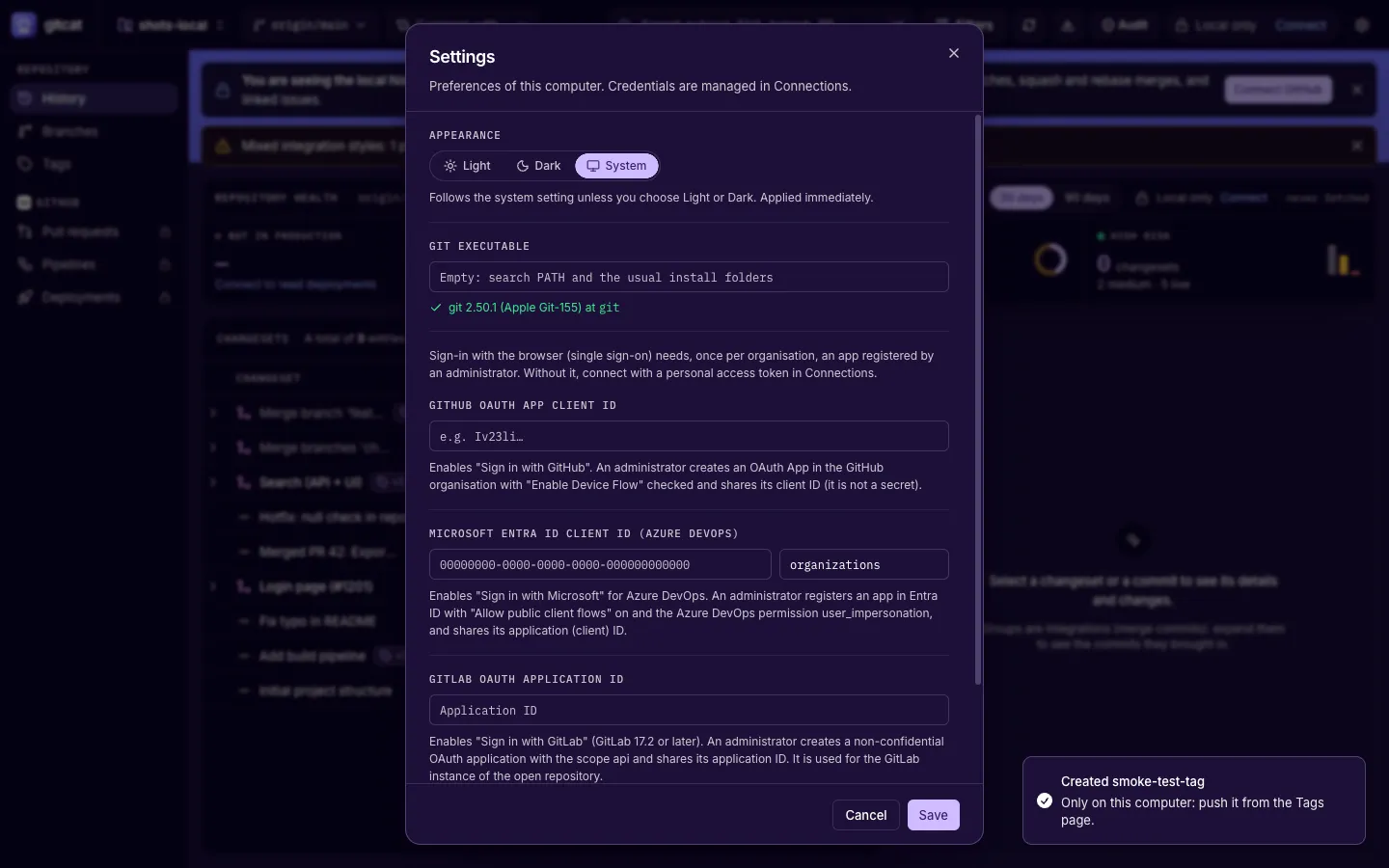
Impostazions: i client ID che a ativin i acès cul navigadôr.
Se la tô organizazion e limite l’acès des OAuth App, al podarès coventâ che un proprietari al aprovi la app prime che si puedin lei i siei repository.
Variabilis di ambient
| Variabile | Ûs |
|---|---|
MERGECAT_GITHUB_CLIENT_ID | Client ID de OAuth App par Jentre cun GitHub. Al compile la impostazion cuant che e je vueide. |
MERGECAT_GITHUB_API_URL, MERGECAT_GITHUB_GRAPHQL_URL | Endpoint REST e GraphQL di GitHub, doprâts pai test (plui indenant par GitHub Enterprise). |
Dutis lis variabilis a son listadis in Configurazion.
Risoluzion dai problemis
| Sintom | Ce fâ |
|---|---|
| Jentre cun GitHub al è disativât | Inserìs il client ID de OAuth App in Impostazions, o dopre la GitHub CLI o un token. |
The GitHub CLI (gh) is not installed or not on PATH. | Instale la GitHub CLI, o dopre un altri metodi di acès. |
The GitHub CLI is not signed in. Run "gh auth login" first. | Eseguìs gh auth login intun terminâl, po torne prove. |
The organisation that owns … requires SSO authorisation for this token. | Autorize il to token di acès personâl pal SSO de organizazion al colegament tal messaç (su GitHub: Settings › Developer settings › Personal access tokens, Configure SSO). |
Repository … not found on GitHub, or the account has no access to it. | Controle che il to account al rivi a viodi il repository; la organizazion e podarès vê di aprovâ la app o il token. |
GitHub rejected the saved sign-in (…). Sign in again in Connections. | Il token al è stât revocât o al è scjadût: disconetiti e torne a jentrâ. |
API rate limit reached; it resets at … | Spiete fin ae ore mostrade, po inzorne. |
| Il repository al è su GitHub Enterprise Server | No ancjemò supuartât: i siei remote no vegnin ricognossûts, e une conession a github.com no vâl par lui. |